Thursday, December 6, 2007

Yuwie Press Release

Is Yuwie.com a Glimpse into Future of Online Business?

Social networking site attempts to outflank MySpace & Facebook by sharing advertising revenues with end-users.

Norma, Okla. (PRWEB via PRWebDirect) December 3, 2007 -- Yuwie.com, one of the Internet’s newest social networking sites, today announced the details behind their innovative and highly successful new online business model.

“MySpace and Facebook have already proven how business can make money from the efforts of end-users,” said Korry Rogers, founder and CEO of Yuwie. “Yuwie is proving that both businesses and end-users can finally share the $100 million per month advertising revenue that floods into the social networking market today.

” Rogers explains that Yuwie’s business model is based upon two core tenants: 1) End-user participation is free – no sign-up fees or subscription fees are required, and 2) Yuwie currently distributes well over half of the site’s advertising revenue back to participating end-users. Not only are Yuwie’s end-users paid for the traffic generated for their own personal page, but also for the traffic generated by friends they refer to the site, in addition to traffic generated from their friends’ subsequent referrals (for up to ten (10) layers or generations of personal referrals).

"The revenue potential for end-users is striking and very exciting once you start to run the numbers;” explained Rogers. "If someone only refers three of their friends, who refer three of their friends through ten levels, that one person will ultimately collect a percentage of advertising revenues from about 88,000 end-users, which can translate to about $8,800 per month for that person – every month.

" So far, end-users’ response to Yuwie’s new business model has completely shattered initial projections by attracting 300,000 registered members to Yuwie’s brand of social networking – in just five (5) months. Moreover, Yuwie’s growing page views, which currently total 1,800,000 per day, have catapulted the website’s global ranking from below the top 100,000 list, to one of the top 2,500 websites in the world.

About Yuwie.com, Yuwie (Yuwie.com) is the world’s first social networking site that truly allows end-users to collect a percentage of online advertising revenues generated from the website. By integrating end-user personalization, social networking tools, and monthly income potential for end-users, Yuwie appears poised to usher in the next-generation of online business.
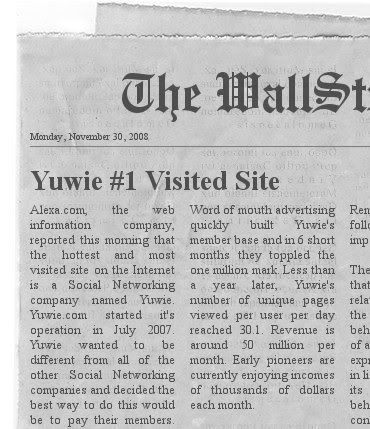
Yuwie Layouts and Info

Wednesday, December 5, 2007

Pink Lady Layout


My youngest daughter loves fashion, so I made this layout for her. But now its available for anybody who loves fashion to use.

To see all my layouts click here.

Tuesday, December 4, 2007

Hello Kitty Layout


My oldest daughter loves Hello kitty, so I made this layout for her. But now its available for anybody who loves Hello Kitty to use.

To see all my layouts click here.

Thursday, November 22, 2007

Free Yuwie User Option (contact) Tables

I wrote a tutorial on how to make your own custom option (contact) tables, which can be used for making Yuwie or Myspace contact tables.

This time I am going to give you some of the option tables I already made for Yuwie, free.

Just right click the option table you like and save it to your computer, then open up your photobucket and upload the image from your computer to photobucket.

Once it has been uploaded into photobucket you can use the code that photobucket generates, to paste in your layout.

Here are a few contact tables, if you dont see what you like keep checking back or let me know what you are looking for and maybe I will make it.

See you on Yuwie...

Love

Yuwie Contact Table

Pink Love

Yuwie Contact Table

Peeps

Yuwie Contact Table

Monster Energy

Yuwie Contact Table

Monster Energy 2

Yuwie Contact Table

To see all my layouts, click here.

For more info on Yuwie visit, here.

Tuesday, November 20, 2007

Yuwie Users Option (contact) Table Tutorial

How to make a Yuwie users option (contact) table.

Alot of Yuwie members have been using Myspace contact tables for their users option table without realizing that the information on the Myspace contact table is different than the information on the Yuwie users option table.

So I am going to teach you how to make your own, so you don't have to use Myspace ones anymore.

Here is the programs I use to make my own Yuwie option tables, Microsoft office picture manager, paint.net and photobucket.com.

The first thing you need to do is save this option table to your computer.

Yuwie Layout and Contact Table

Then save a picture on your computer that you would like to use for a option table. Then resize the picture down to as close as you can get to 310 x 150 and then crop it the rest of the way. Once you have the picture sized to 310 x 150 save it on your computer.

Now open up paint.net, click on layers, then import from file, then browse your picture files looking for the option (contact) table, click open, and it should show up on paint.net.

Then go to layers again, then import from file, browse your picture files looking for the picture you resized to 310 x 150, click open, and it should show up on paint.net.

It will look like the option table is gone but it is not, it is underneath your picture.

Now click layers, then layer properties, then slide the opacity arrow to the left until you see the option buttons thru your picture, click ok. It should look like this.

Yuwie Layout and Contact Table

Then go to tools and click the letter A (for text), then go up top and pick font and font size, then go to colors and choose a color, now you are ready to start typing.

Click on the picture over top of the message button and begin typing, then when you are finished typing, use the hand on the + sign to move it into postion over the message button, now go to the next button and repeat, keep doing that until you are done. You can move your typing over any part of the buttons, I like to move mine to the top so it will be centered better when finished. It should look like this.

Yuwie Layout and Contact Table

Now that you are finished typing what you want onto the options table, click layers, then layer properties, slide the opacity arrow all the way back, so the transparency is off, click ok.

Then click the options table in the little blue layers box and click delete. You just deleted the options table from underneath the picture.

Now click file, then save as, then name it and make it a gif file, then click save. The final should look like this.

Yuwie Layout and Contact Table

Now open photobucket.com, then log in, go to your album, then click browse, find the finished options (contact) table, click open and then upload. Now click on the direct link and copy it, close photobucket.

Now open Yuwie, then log in, go to control panel, then edit profile, then click the layouts tab, then click launch generator, and paste the link into the users option (contact) table were it says background image url.

Thats it, now you have your own custom Yuwie user options (contact) table with the links all in the right places.

For more info on Yuwie you can visit, here.

To check out my Yuwie layout, click here.

Monday, November 19, 2007

Seattle Seahawks Layout


The Seattle Seahawks are a professional American football team based in Seattle Washington. Seattle is the only team to play in both the AFC (American Football Conference) and NFC Championship Games.

Check out my other layouts here.

Dallas Cowboys Layout


The Cowboys are the most successful football team since 1960. They have won 5 Super Bowls and 8 Conference Championships. The Cowboys have more victories on Monday Night Football than any other NFL team.

Check out all my layouts here.